28 Apr 2026
~
Загрузок
~
Лайков
~
Просмотров
~
Элементов
Дождитесь загрузки BDE для получения команды
Получить команду
Для Командного Блока или Axiom мода
Пожаловаться
Есть отзыв, спасибо или предложение по модели?
Оставьте комментарий внизу страницы - это поддержит автора.
Описание

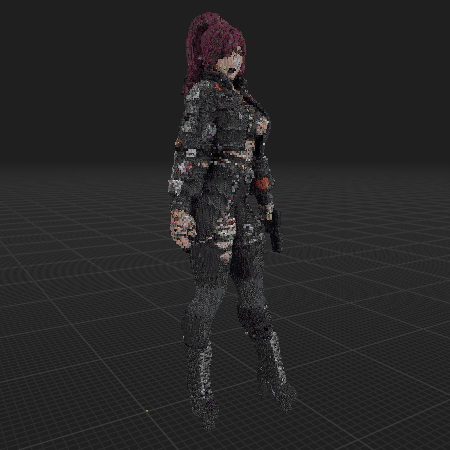
Action Female Character Model. Ultra Detailed. Maded With OBJToSchematic. Axiom Recommended #roleplay #decoration #cute #statue

Модель содержит
mud: 4179
cracked deepslate tiles: 2210
cracked deepslate bricks: 2983
deepslate tiles: 1249
deepslate bricks: 1572
gray wool: 155
chiseled deepslate: 699
polished blackstone bricks: 1532
observer: 83
deepslate coal ore: 664
cracked polished blackstone bricks: 894
netherite block: 606
blackstone: 2153
gray concrete: 279
polished deepslate: 672
deepslate: 827
cracked stone bricks: 179
deepslate copper ore: 217
cobbled deepslate: 940
stone: 79
coal ore: 220
gray concrete powder: 412
blast furnace: 70
chiseled stone bricks: 44
polished basalt: 170
smooth stone: 258
diorite: 183
dead brain coral block: 48
deepslate iron ore: 160
tuff: 53
light gray concrete powder: 278
mossy stone bricks: 4
gravel: 38
stone bricks: 71
andesite: 112
light gray wool: 166
lodestone: 17
black concrete powder: 2122
polished andesite: 84
clay: 137
sticky piston: 22
black wool: 1181
cobblestone: 62
coal block: 1038
cyan terracotta: 181
smoker: 28
reinforced deepslate: 14
dead horn coral block: 9
dropper: 36
gray glazed terracotta: 21
purple terracotta: 1417
black concrete: 680
crimson planks: 2177
lime wool: 472
polished diorite: 189
furnace: 3
basalt: 42
redstone ore: 120
acacia wood: 72
polished blackstone: 213
white wool: 8
deepslate redstone ore: 404
smooth basalt: 101
mycelium: 17
iron ore: 70
dead fire coral block: 23
white terracotta: 331
cherry planks: 63
muddy mangrove roots: 64
white concrete: 79
gilded blackstone: 122
dead tube coral block: 5
deepslate gold ore: 17
light gray terracotta: 92
birch wood: 45
soul soil: 168
soul sand: 74
black terracotta: 48
cherry log: 17
acacia log: 24
cracked nether bricks: 366
warped nylium: 192
chiseled nether bricks: 333
waxed exposed copper: 24
brown terracotta: 10
ancient debris: 104
raw iron block: 76
stripped cherry log: 11
brown glazed terracotta: 31
waxed exposed cut copper: 22
stripped dark oak log: 2
black glazed terracotta: 53
bone block: 14
gray terracotta: 13
fletching table: 8
dripstone block: 22
coarse dirt: 3
chiseled quartz block: 3
netherrack: 21
pink terracotta: 14
stripped mangrove log: 5
waxed cut copper: 25
iron block: 12
red glazed terracotta: 6
smithing table: 6
nether quartz ore: 24
red terracotta: 5
stripped dark oak wood: 1
note block: 5
purpur pillar: 4
cherry wood: 801
stripped crimson stem: 148
stripped mangrove wood: 5
magenta terracotta: 188
light blue terracotta: 6
blue terracotta: 44
stripped crimson hyphae: 240
deepslate lapis ore: 5
light gray concrete: 1
obsidian: 25
calcite: 2
stripped cherry wood: 20
warped stem: 1
purpur block: 8
diamond ore: 1
white concrete powder: 1
smooth sandstone: 3
light gray glazed terracotta: 3
nether bricks: 215
crimson hyphae: 5
dirt: 4
red concrete powder: 1
deepslate diamond ore: 1
warped hyphae: 2
mud bricks: 5
crimson stem: 5
mangrove planks: 3
bricks: 6
magenta concrete: 21
snow block: 1
waxed copper block: 1
magenta wool: 9
mangrove log: 1
pearlescent froglight: 1
gold ore: 1
polished granite: 3
jukebox: 1
granite: 2
purple glazed terracotta: 1
birch planks: 2
budding amethyst: 1
target: 1
oak planks: 1
Как переместить или повернуть модель?

Используйте окно редактора выше, чтобы повернуть или переместить модель так, как вам нужно, а затем нажмите кнопку Получить команду, чтобы получить новую команду.
Если вы хотите внести больше изменений или полностью переделать модель, откройте полную версию редактора с помощью кнопки Открыть в BDEngine.

Как использовать?

Через командные блоки:

Чтобы использовать команду в игре, вам нужен Командный Блок, так как поле чата в Minecraft имеет ограничение по количеству символов.

      1. Open the chat on the "/" button and paste this command into it:
/give @p command_block
      2. Place the Command Block in the desired location.
      3. Right-click on the Command Block and specify in the Console Command field - this model's command, which you can copy by clicking on Get the command.
      4. Change Need Redstone to Always Active.
      5. Press Done.

Теперь вы можете сломать Командный Блок и насладиться установленной моделью. Повторите процедуру несколько раз, если в окне экспорта есть несколько команд модели.

Через Axiom мод:

Обязательно установите Axiom [modrinth], если вы этого еще не сделали.

      1. Click Get the command, select Command format: Axiom and copy the command.
      2. Open the desired world in the game.
      3. Use ctrl + V to insert a model into the world.
      4. Click on the small white cube, next to the model, to move and rotate it.

Хотите оставить комментарий?
Войдите или зарегистрируйтесь - это займёт всего минуту.
wolfiekYT
Автор
wolfiekYT
Автор
Я играю на:
Играют: ~/~

Попробуйте мои ресурспаки

Sign up to create and share content. Sign up
Студия
Сообщения
Войти
Обзор